Working from home has incredible freedom — but it also quietly sets up some expensive habits. Without an office built for your body, most people end up hunched over a regular desk or even the sofa for 8+ hours a day. The result? Back pain, neck strain, fatigue, and a focus that fades by early afternoon.
We're CHEUKHAM Furniture (Zhuhan Furniture Co., Ltd.), manufacturers of electric standing desks in Shunde, Guangdong. Here's our practical guide to building an ergonomic home office — starting with the single biggest lever: a sit-stand electric desk.
An "ergonomic" workspace is designed to fit your body, not force your body to fit it. At home, you don't have an HR department enforcing standing rules — so the onus is on you. The good news: a few well-chosen pieces make a dramatic difference, and a standing desk is the foundation everything else builds on.
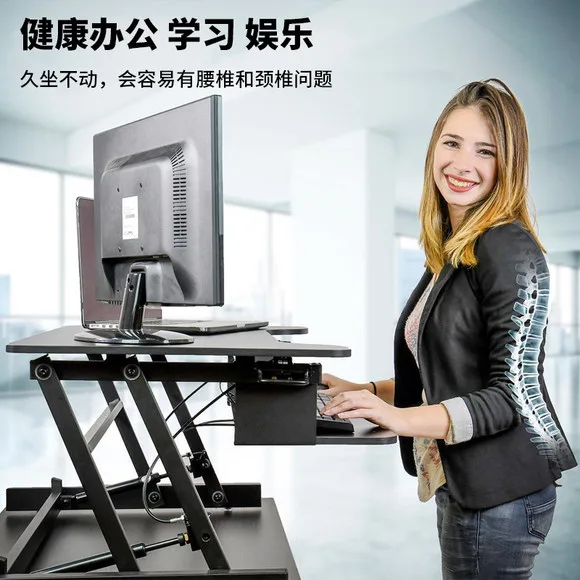
Sitting for long hours loads the discs in your lower spine far more than standing. An electric standing desk lets you alternate postures, relieving that pressure. Even small changes — standing for 5 minutes every hour — add up over a workday.
A standing desk makes it easy to raise your monitor surface to eye level (especially with a monitor riser), so you're not craning your neck down at a laptop. Fixing your screen height is one of the fastest wins for neck pain.
Sitting still all afternoon = sluggish brain. Switching to standing, stretching, or walking while on a call re-energizes you. Many of our customers report fewer post-lunch slumps after switching to an adjustable desk.
Standing gently activates your leg muscles and keeps blood flowing — the opposite of being frozen in a chair for hours.
A dedicated, adjustable desk signals to your brain (and household) that this is work space. It also fits different users — if family members share it, height adjustment means everyone gets a comfortable setup.
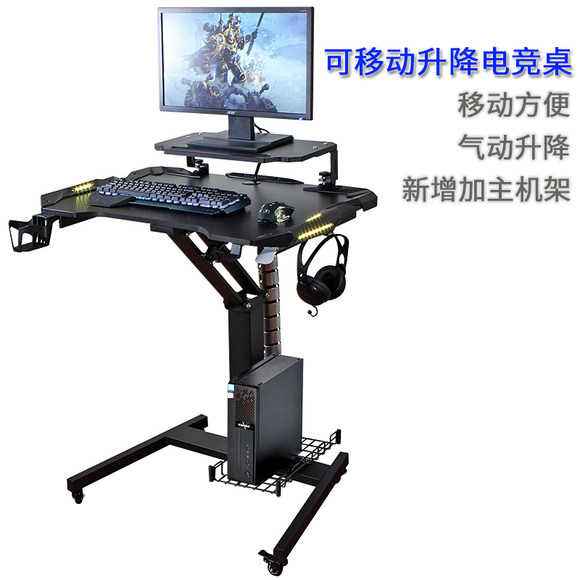
Your home office is where you spend much of your working life — treating it as an ergonomic investment, not an afterthought, pays off in comfort, health and output. You can start today with a two-minute message. Our product range includes dual-motor electric standing desks, mobile rolling desks and our best-selling adjustable gaming desk.
We are the manufacturer — send us your specs and get a factory-direct answer within 24 hours.
Contact CHEUKHAM →