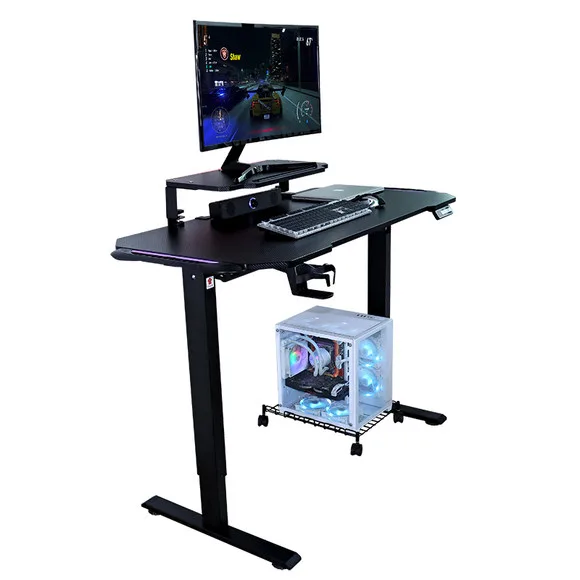
A home office is the only workplace where the person using the desk also pays for it, assembles it, and lives with every compromise. That is why so many home setups end up with the same complaint six months in: the desk is the wrong height, it wobbles on a video call, or it simply does not fit the room once a monitor arm and a chair are in place. This guide walks through the decisions in the order they actually matter — measure the room, get the height range right, choose the drive type, build the desktop, manage power and cables, and only then compare prices. It is written for the person setting up one desk properly, and for the operations manager equipping a whole remote team.
Everything below applies whether you are buying a single electric desk for a spare bedroom or sourcing 40 units for staff working from home. The physics of height range, depth clearance, and motor load do not change with volume — only the paperwork does.
1. Why the desk decides whether the whole setup works
Chairs get the attention because they are obviously ergonomic. Desks quietly determine whether any of that ergonomics can happen:
- Height range sets your posture — if the desk cannot reach your standing elbow height, you will stand hunched. If it cannot drop low enough for your seated height, you will raise your chair and lose foot support.
- Depth sets your viewing distance — a shallow desk forces the monitor close, which is the single most common cause of eye strain and neck pain in home offices.
- Stability sets whether you trust it — a desk that rocks when you type will stop being used for standing within a month, whatever the marketing says.
- Movement sets whether you actually switch — a desk on castors can be rolled out of the way, which is what makes a multi-purpose room genuinely multi-purpose.
The practical conclusion: buy for the room and the body first, and for the feature list second. A mid-range desk that fits beats a premium desk that does not.
2. Step one: measure the room before you buy anything
Home offices fail on space far more often than on budget. Before looking at a single product page, measure and write down four numbers:
- Wall length available — the maximum width your desk can occupy without blocking a door swing or a radiator.
- Depth clearance — the desk depth plus the space your chair needs to roll back. A 60 cm deep desk in a room with 70 cm of clearance means you will never sit comfortably. Plan for 60–80 cm of desk depth plus 60–80 cm of chair travel.
- Window and socket positions — monitors should not face a window directly (glare), and you should not need an extension lead across a doorway.
- Ceiling and shelf height when standing — if the desk rises to 120 cm, anything above it must clear your head, not just the seated desk.
If the room is genuinely tight, two formats solve it better than a full-size desk: a height-adjustable desk with a folding keyboard tier (which recovers working depth without widening the footprint), or a mobile sit-stand desk on castors that can be parked against a wall when the room is used for something else. Both are common requests in small apartments and shared rooms, and both are far better than forcing a 160 cm desk into a 150 cm gap.
3. Step two: get the height range right (the calculation most people skip)
This is the part that separates a desk that works from one that gets abandoned. Do the arithmetic once:
- Seated working height — sit with your feet flat, upper arms relaxed and vertical. The desk surface should meet your forearms at roughly elbow height. For most adults this lands between 68 cm and 76 cm.
- Standing working height — stand with arms relaxed. Same rule: forearms level, elbows around 90–100 degrees. Most adults land between 100 cm and 118 cm.
- Your required range — the gap between those two numbers is what the desk must cover. A desk advertised as "height adjustable" but spanning only 72–115 cm will not serve a shorter user seated or a taller user standing.
Two things worth checking before you buy:
- Does the range include a low enough seated position? Many budget desks bottom out around 72 cm, which is too high for shorter users and children. If more than one person will use the desk, prioritise a wider range over a higher top speed.
- Is the lift speed sensible for the range? Faster is nicer, but smooth and synchronised matters more. A desk that reaches 4 cm/second but shudders on the way up will be used less than a slower, steadier one.
4. Step three: choose the drive — single motor, dual motor, or pneumatic
Three mechanisms cover almost the entire market, and the right answer depends on load and use pattern rather than price alone:
- Single motor — one actuator drives both legs through a linkage. Lighter, cheaper, and adequate for a laptop plus one monitor. This is the sensible choice for a secondary desk or a light home setup.
- Dual motor — two independent actuators lifting in sync. Higher load capacity, steadier under multi-monitor and dual-arm setups, and generally longer-lived under daily switching. If the desk is your primary workstation and carries a monitor arm, dual motor is the default answer.
- Pneumatic / gas-lift — no electricity, no cable to the wall, and fast, quiet adjustment. Excellent for rooms where running power to the desk is awkward, and for desks that get moved around the house. The trade-off is a fixed load ceiling and less fine control than an electric handset with memory presets.
One specification worth asking for in writing: the frame steel thickness. Commercial-grade frames typically use 1.5–2.0 mm steel; cheaper frames drop toward 1.0 mm and reveal themselves as wobble under load. "Heavy-duty steel" is not a specification — millimetres are.
5. Step four: build the desktop before you buy the desk
Home office desks are usually chosen, then filled, and the filling is what breaks the ergonomics. Plan the desktop load first:
- Monitor or laptop — a laptop alone sits too low; plan for a riser or an arm. A monitor arm clamps to the desk edge, so confirm the desktop thickness and rear clearance support clamping.
- Keyboard and mouse zone — you need clear, unobstructed depth in front of you. A keyboard tray tier is the usual fix when the desk depth is limited.
- Audio, light, and camera — small items individually, meaningful weight together. Count them when you compare load ratings.
- What you want to be able to clear away — if the desk doubles as a dining or study surface, weight and portability matter more than capacity.
Then match the load to the drive. A dual-motor frame rated for 100–150 kg will handle a realistic home office without strain; a single-motor frame loaded near its limit will feel sluggish and may lift unevenly over time.
6. Step five: power and cable management (the part that ruins the look)
A desk that moves needs cables that move with it. This is where most home setups look amateur within a week:
- One power route, fixed length — run a single supply to the desk and distribute from a strip mounted underneath, rather than trailing four separate cables to the wall.
- Slack loop, not tension — leave a service loop for the full height travel so the cable is never taut at the top of the range.
- Under-desk tray or grommet — keeps the strip and adapters off the floor and out of the vacuum cleaner's way.
- Labelled plugs — trivial effort, and the difference between a two-minute change and a twenty-minute one.
If the room has no socket near the desk position, a pneumatic desk removes the problem entirely by needing no power at all.
7. The seven mistakes that ruin a home office desk
- Buying before measuring chair travel — the most common failure. The desk fits; you do not.
- Choosing the lowest height as an afterthought — a desk that will not go low enough is uncomfortable for shorter users every single day.
- Single motor on a heavy multi-monitor setup — uneven lift and premature wear.
- Ignoring the frame thickness — wobble is almost always frame steel, not the desktop.
- Forgetting the window — glare on a screen is a daily tax on productivity.
- Cables sized for seated height only — the first time you stand, something pulls.
- Buying one desk with no plan for the next one — if the household or team will grow, buy from a supplier who can repeat the same specification later.
8. One desk or a whole remote team?
If you are setting up a single home office, the guidance above is all you need. If you are the person equipping remote or hybrid staff — 10, 40, or 200 desks — the priorities shift, and the differences are worth understanding before you request quotes:
- Specification consistency — remote staff compare notes. Mixed specifications generate complaints, so lock one configuration and repeat it.
- Phased delivery — pilot a small first run, validate it, then scale. This is standard practice with a factory partner and protects your budget.
- Delivery to individuals, not one warehouse — home-office programmes usually ship to many addresses. Ask how the packaging is designed for single-parcel courier handling.
- Documentation — for a workplace programme you will want test reports and electrical safety documentation on file. Ask suppliers to provide what is relevant to your market before you commit.
This is exactly the model we build for: our bulk and wholesale programme covers small pilot runs through to repeat container orders, with the same specification held across shipments. If you are sourcing for a remote team, start there. If you are a distributor or importer looking at our range for your own catalogue, the full product line is on the products page, and we are happy to quote against your target specification.
9. Your setup checklist
- Measured wall length, desk depth, chair travel, socket position, standing clearance.
- Calculated seated and standing working heights; confirmed the desk range covers both.
- Chosen the drive type against realistic load (single motor, dual motor, or pneumatic).
- Planned the desktop load and confirmed the load rating with headroom.
- Planned a single power route with a slack loop and under-desk storage.
- Decided whether this is one desk or the first of many — and chosen a supplier accordingly.
Getting these six items right takes about twenty minutes and prevents almost every "I wish I had bought differently" outcome. If you would like a recommendation for a specific room size, height range, or a multi-desk order, send us the details — measurements, quantity, and destination country are enough for us to come back with a concrete proposal.
Need a Quote or an OEM Partner?
We are the manufacturer — send us your specs and get a factory-direct answer within 24 hours.
Contact CHEUKHAM →